Rocket Defense
Missile Command reborn — intercept before your cities fall.
How to Play
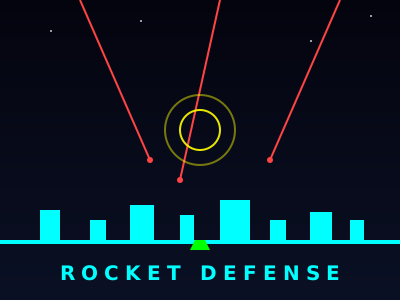
Tap anywhere in the sky to launch an interceptor from your nearest base. The interceptor explodes in a blast radius that destroys any rockets inside it. Collect the power-ups that drift down from destroyed waves — more ammo, a city shield, or a slow-time effect. Pick Easy, Medium, or Hard to set the pace.
Controls
- Mouse / TouchTarget sky
- Click / TapLaunch interceptor
- P / ESCPause
About This Game
Inspired by the classic Missile Command formula. Incoming rockets streak down from orbit, and your cities are the target. Tap or click the sky to launch interceptors from your nearest base. Grab falling power-ups — more ammo, shields, even time-slow — and survive as long as you can against ever-faster, MIRV-splitting waves.
What is Rocket Defense?
Rocket Defense is a tense point-and-click defense game inspired by Missile Command, the 1980 Atari arcade classic that turned the Cold War into a pure reflex test. Enemy rockets streak down from orbit toward your cities and bases. You fight back by tapping or clicking anywhere in the sky — an interceptor launches from your nearest base, arcs to the target, and detonates in a blast radius that destroys any rockets inside it. The tension comes from juggling multiple threats at once: later waves fire MIRVs that split mid-descent, so one missed interception can easily turn into three or four incoming warheads. Power-ups drift down from destroyed waves — extra ammo, shields for your cities, and even a brief time-slow effect. Three difficulties (Easy, Medium, Hard) scale rocket speed, MIRV frequency, and wave length. Play Rocket Defense free in your browser — no download required.
Tips & Strategy
- Target clusters, not single missiles. One well-placed blast can take out three incoming warheads; two precise shots on two targets wastes ammo.
- Aim ahead of fast-moving threats. Your interceptor takes time to reach altitude — leading the target is always more accurate than chasing it.
- Prioritise the lowest threats first. A rocket at 20% altitude is a committed kill within seconds; a high rocket is a target you can address on the next beat.
- Conserve ammo on weak waves. Easy early rounds tempt you to over-shoot — every interceptor saved is one you have for the MIRV-heavy later waves.
- Cover all three base sections. Funnelling every interceptor from one base leaves the other two vulnerable when a flank attack comes through.
Frequently Asked Questions
Is Rocket Defense like Missile Command?
Yes — Rocket Defense is directly inspired by Missile Command, the 1980 Atari arcade classic. The core idea is identical: defend cities from incoming ballistic threats by triggering interceptor detonations in the sky. Rocket Defense modernises the formula with MIRVs, falling power-ups (ammo, shields, time-slow), and modern touch-friendly controls.
How does Rocket Defense work?
Enemy rockets fall from orbit toward your bases and cities. You tap or click anywhere in the sky to launch an interceptor from your nearest base. When the interceptor reaches the tapped point it explodes in a blast radius that destroys any rocket inside. Survive as many waves as possible before your bases are destroyed.
Does Rocket Defense get harder over time?
Yes, significantly. Early waves send a handful of slow-moving single rockets; later waves introduce MIRVs (missiles that split into multiple warheads mid-flight), faster descent speeds, and tighter timing between salvos. Three difficulty settings let you choose the starting baseline — Easy ramps up gently, Hard throws MIRVs at you from the first wave.
What are the controls for Rocket Defense?
Mouse-click or touch anywhere in the sky to launch an interceptor from the nearest base to that point. P or ESC pauses. That's the entire control scheme — by design, the game is instantly pick-up-and-play on any device from a desktop to a phone.